

What if marking could fit into the gaps of a teacher’s day — the ten minutes in the staff room, the bus ride home, the lull before a parents’ evening — instead of demanding a four-hour block on a Sunday evening? That’s the idea behind Teacher Marking Assistant, a new web-based app designed to make marking portable, quick to set up, and genuinely sustainable.
The launch comes with a 30-day free trial, and EdTech 4 Beginners readers can use the code VZLLHRPN for 30% off any plan until 31st June 2026.
Marking that travels with you
Open the app on a laptop in the staff room and mark for ten minutes between lessons. Pick it up on a tablet on the bus home. Carry on from a phone while waiting for a meeting to start. Every annotation, every score, every grade saves automatically and syncs across devices, so picking up where you left off takes seconds.
Twenty minutes on the metro can chip through four or five papers. A free period in the staff room can finish another six. The dead time between school and dinner becomes the moment a class quietly gets marked — and by the time the front door is in sight, the pile is already shorter.
How the marking loop works
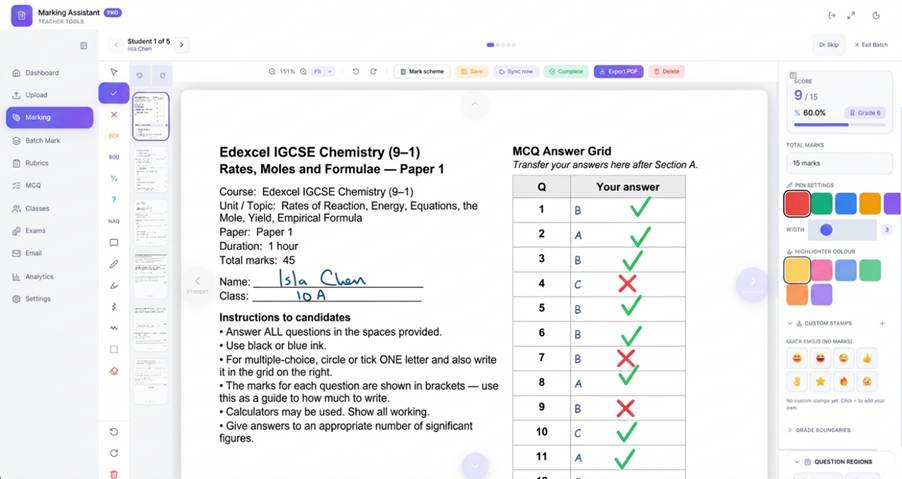
Teachers upload scanned exam papers as PDFs. Marking happens on a clean canvas with all the symbols teachers actually use: tick, cross, ECF, BOD, half-marks, comment boxes, highlighter, freehand pen and custom text stamps. The app counts the ticks, calculates the percentage, applies your grade boundaries, and files everything in per-student folders. One click sends marked PDFs back to students by email — and to parents, when their addresses are on file.
It runs in any modern browser, on any device. PC, Mac, iPad, Android tablet, phone — all work the same way, all stay in sync.
Features that save real time
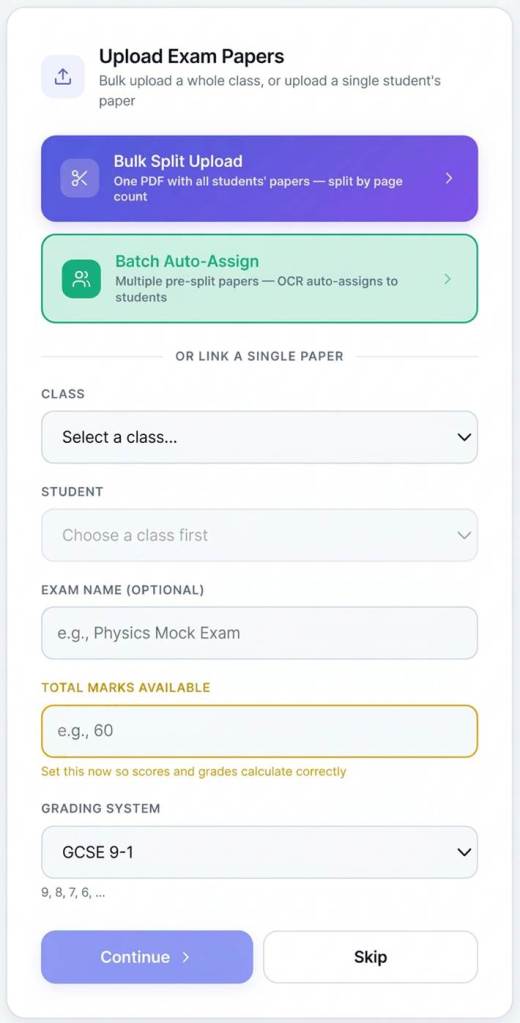
A whole class through the photocopier — sorted automatically.
This is the workflow that turns marking-day prep from a long job into a short one. Run a full class’s worth of papers through a photocopier or document scanner in a single pass — 28 students, four pages each, 112 sheets in one stack. Drop the resulting scan into the app and tell it how many pages make up each assessment.
That’s it. The app slices the scan into 28 separate papers, runs OCR on the front page of each one to read the student’s name, fuzzy-matches the names against the class list, and files each paper into the correct student’s folder. Anything ambiguous comes up on a confirmation screen with a searchable list — a couple of clicks and it’s done.
In roughly the time it takes to boil the kettle, the whole class is sorted, named, and ready to mark.
A live annotation canvas
The toolbar carries the full set of marking symbols: tick, cross, error carried forward (ECF), benefit of doubt (BOD), half-mark, vertical and horizontal zigzag lines, freehand pen, highlighter, comment boxes, and custom text stamps for things like “sp” or “show working”. Tap to place. Drag to draw. Annotations can be moved, resized or deleted at any time — nothing is permanent until export.
Auto-scoring and grades
Every tick adds 1 to the score. Half marks add 0.5. The score updates live as you mark. Grade boundaries are set once — 9–1, A*–E, or any custom labels — saved as a template, and reused for future papers. By the time the last paper is marked, the percentage and grade are already there.
Multiple-choice marking
Pick a template — 10, 30, or 50 questions — type in the answer key, and the app marks the answer sheets automatically. Every paper is scored against the key, percentages and grades are calculated, and results drop straight into the grade book alongside written-paper marks. For teachers running regular end-of-topic quizzes, this single feature can save an entire evening.
Batch marking mode.
Mark Q3 across all 28 papers in a row, then move on to Q4. The app auto-saves and jumps to the same page on the next student. If you spot something to adjust in the mark scheme halfway through, jump back, re-mark that one question across every paper, and the scores update themselves. The result is faster and more consistent, because the same mark scheme stays fresh in your mind the whole way through.
Class and question analytics
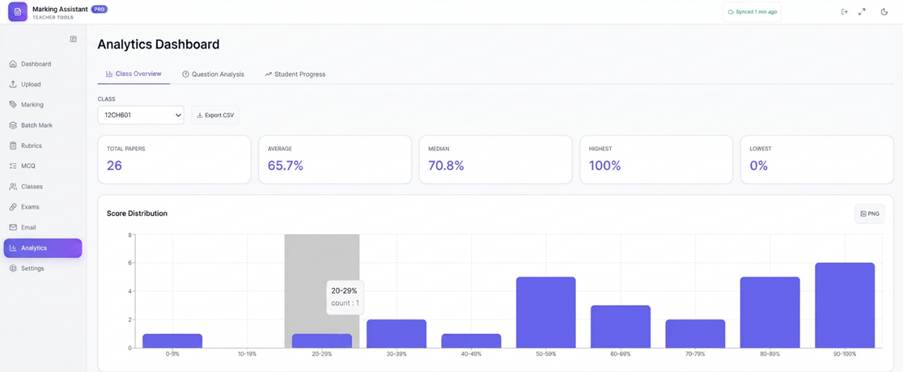
Once a class is marked, a small dashboard shows per-question averages, class progress across multiple exams, and score and grade distributions — focused, useful information designed for the conversations that happen at parents’ evening.
One-click email — students and parents in the loop.
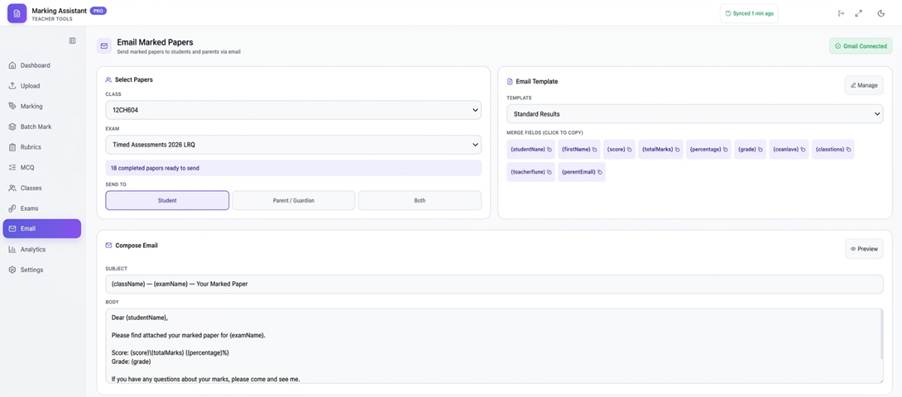
Send marked PDFs straight from your own Gmail account, with merge fields for name, score, grade and a standard feedback line. Bulk-send the whole class in one go, with parents looped in automatically when their email addresses are on file. Students see exactly how they did, and parents see it the same evening.
Designed with teacher judgement and data privacy at the core.
A few principles built into the app from day one:
Teachers mark the work. The app counts, files, calculates and emails — but the teacher decides what gets a tick. Professional judgement stays exactly where it belongs.
Your data stays under your control. Papers, annotations and grades are stored on your local machine, with optional sync to your own Google Drive or OneDrive. Nothing sits on a third-party server. Nothing is shared with external analytics. Nothing is used to train AI models. Schools with strict data-protection policies can run the app fully offline, with no cloud sync at all.
Formative assessment that actually happens.
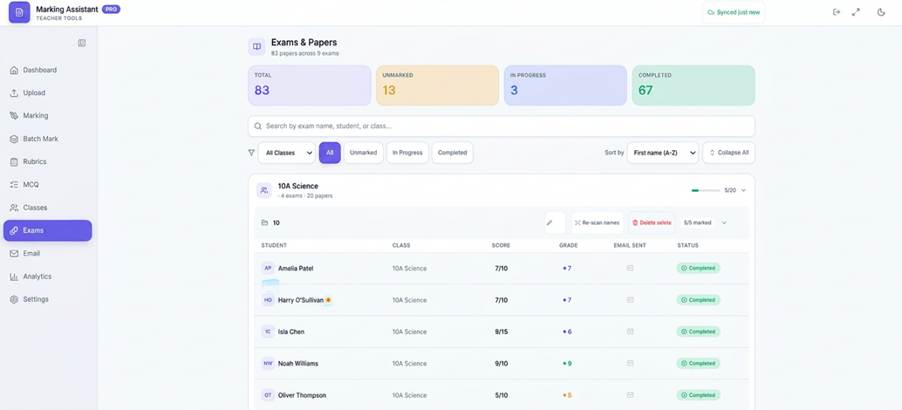
One workflow worth flagging that quietly transforms how mock papers are used: scan the papers, hand the unmarked originals back to the class, and have students self-mark against the scheme first. Then share your marked copy with the students.
Now they engage with the mark scheme. They can see exactly where their answer fell short, and the conversation shifts from “what did I get?” to “how do I get there next time?”.
Who it’s for
Teacher Marking Assistant is built for any teacher who marks student work, and it’s especially useful for:
- Teachers who want to mark anywhere without carry a stack of papers.
- Subjects where marks build up across many small ticks — sciences, MFL, maths.
- Teachers who set regular multiple-choice quizzes
- Anyone marking the same paper across a whole class.
- Teachers who want to encourage their students to engage with the mark scheme, not just look at a score.
How to try it
There’s a 30-day free trial — no credit card up front. After the trial, there’s an affordable Solo Teacher plan, plus school and department licensing for teams. EdTech 4 Beginners readers can use code VZLLHRPN at checkout for 30% off.
Visit teachermarkingassistant.com to get started, or watch the short demo on the homepage to see the app in action.


